
Built by subcontractors, for subcontractors.
Get every pay app out on time.
Get every dollar back in.
Designed to protect your bottom line,  subPAY.ai is your cash flow assistant: one view of every active job, with upcoming pay apps, unbilled contract balances, retainage, and pending change orders in one place.
Card required to start. Cancel from your account before day 14 and you pay nothing.
See subPAY.ai at Work
Tap the screen to enlarge.
Tap the screen to enlarge.
Tap the screen to enlarge.
Tap the screen to enlarge.
Tap the screen to enlarge.
Shown with a sample company. All names and figures are fictional.
No signup. A sample company, the real screens.
Stop Missing Draw Deadlines. Take Control of Subcontractor Billing.
subPAY.ai was built by trade subcontractors to end the friction, missed deadlines, and lost revenue of commercial billing. When you're managing projects across scattered general contractor portals, it's easy to miss a cutoff, miscalculate retainage, or do change order work that never gets billed. subPAY.ai brings your billing cycles, contract values, and billing documents into one clear, reliable system.
How subPAY.ai Keeps You Organized
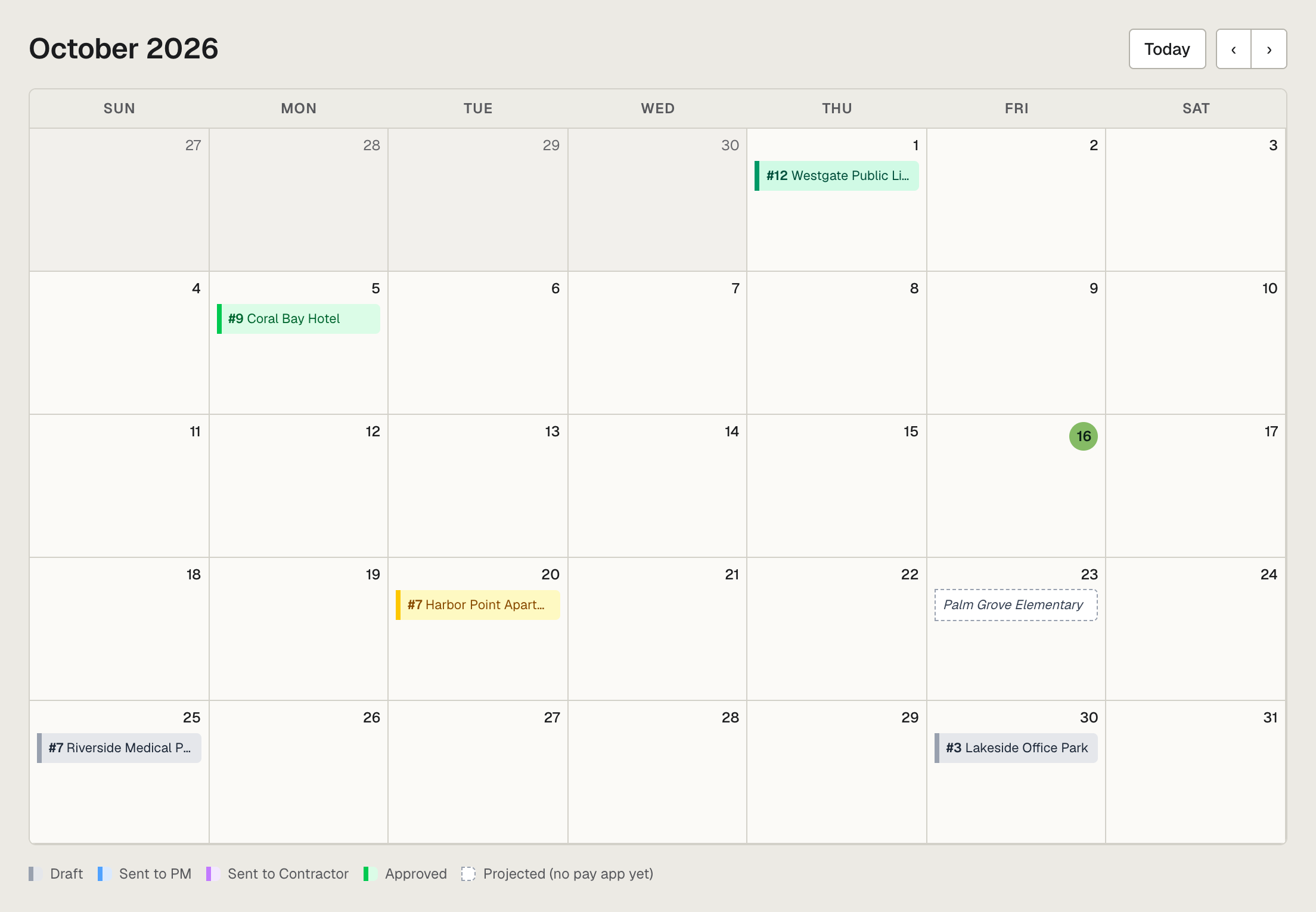
One Master Billing Calendar
Every general contractor runs on a different billing cycle.
subPAY.ai puts all your monthly pay app deadlines on one calendar. Whether a GC wants submissions through Procore, Textura, GCPay, or emailed PDFs, subPAY.ai emails your project managers and accounting team reminders ahead of the cutoff, so you never miss a draw.Smart Import: AI That Reads Your Paperwork
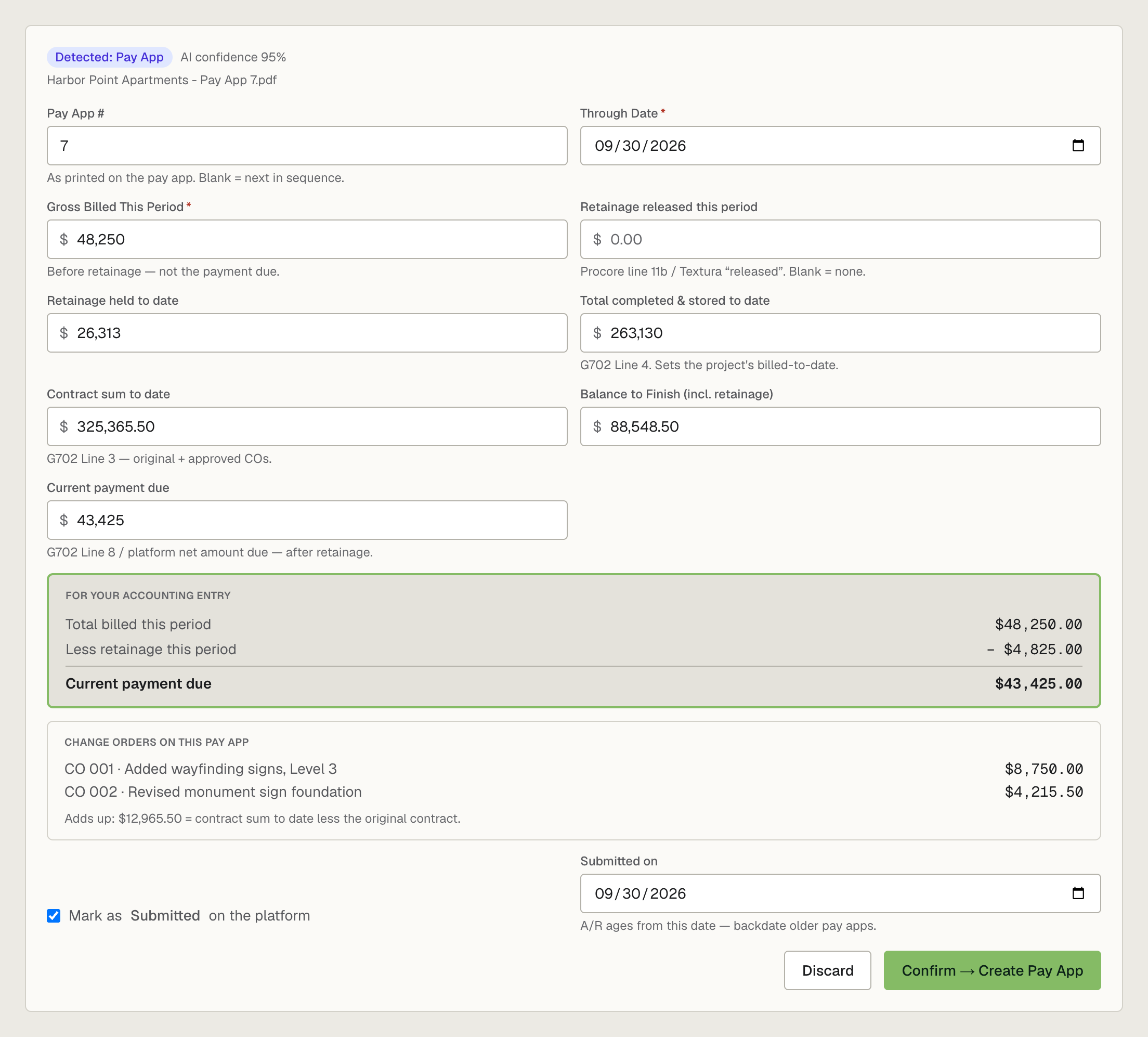
No manual rekeying. Drop in a signed pay application, continuation sheet, change order packet, or a release of lien from your GC.
subPAY.ai reads it, checks the math, and fills in the application number, period-to-date, gross billed, retainage, change orders, and current payment due. Nothing is saved until you confirm it.AIA G702/G703 Pay Applications in Minutes
Billing a GC directly? Build the continuation sheet like a spreadsheet. Roll-forwards, retainage, and the G702 cover sheet compute themselves, and the PDF is ready to sign and send.
Retainage & Change Order Tracking
subPAY.ai checks each new pay application against the one before it, so a gross billed that doesn't match your completed-to-date gets caught. It tracks retainage held and released over the life of the job at whatever rate your contract sets, including a reduction partway through, and matches the GC's approved change orders to your requests, flagging any that don't add up to the contract sum. No surprises at closeout.Every Pay App, Tracked to Paid
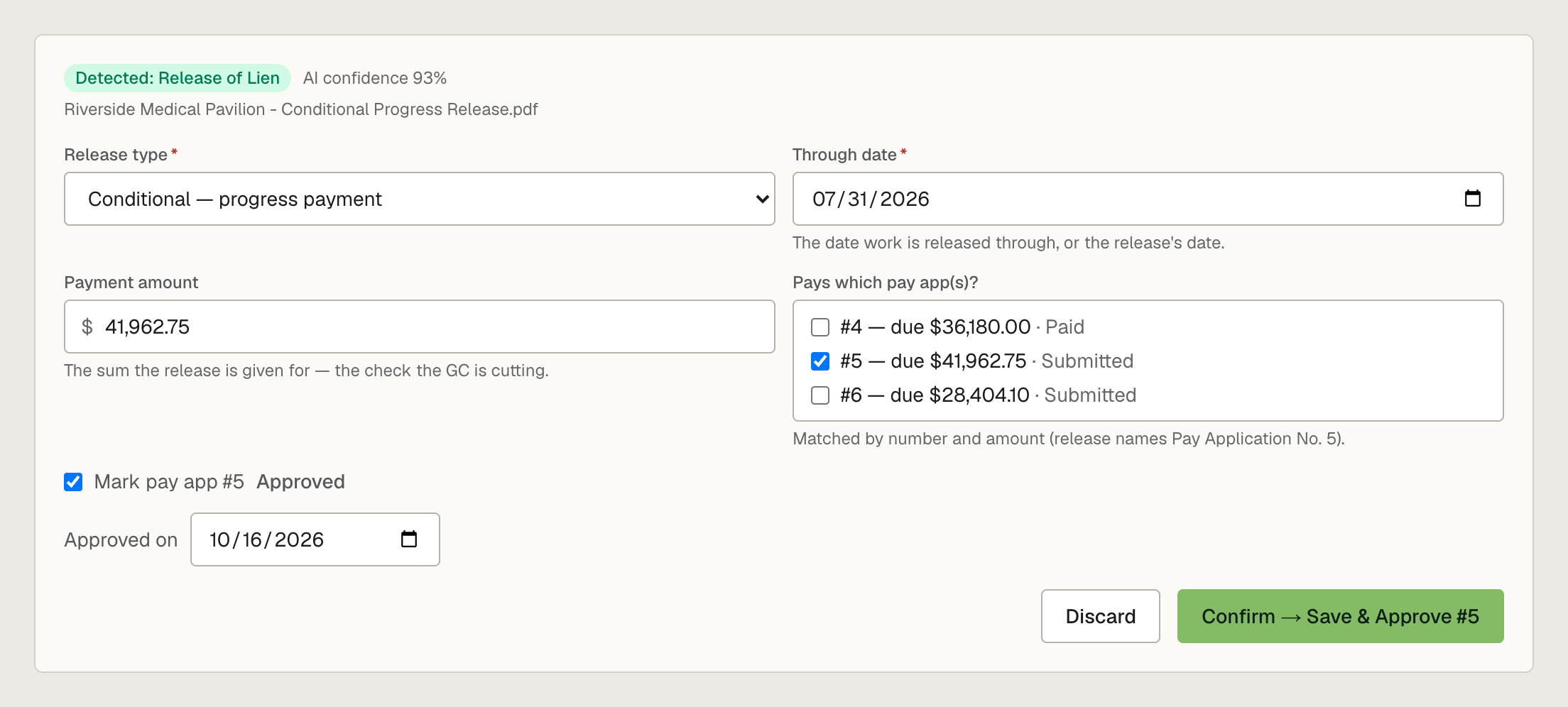
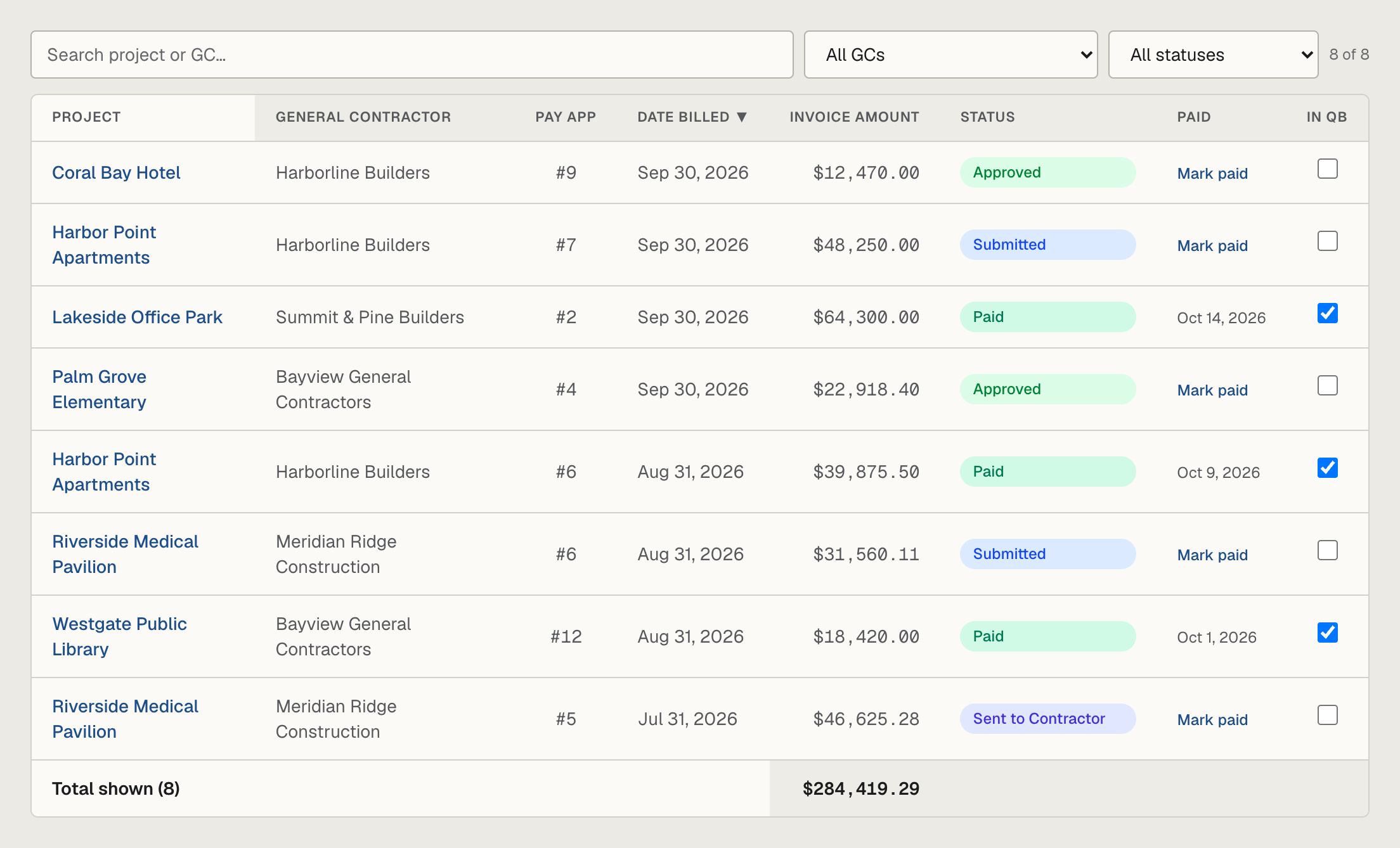
Each pay application moves from submitted to approved to paid. When a GC sends a release of lien,
subPAY.ai matches it to the pay app it pays and marks that pay app approved, and it flags anything sitting unapproved for 60 days.Cash Position at a Glance
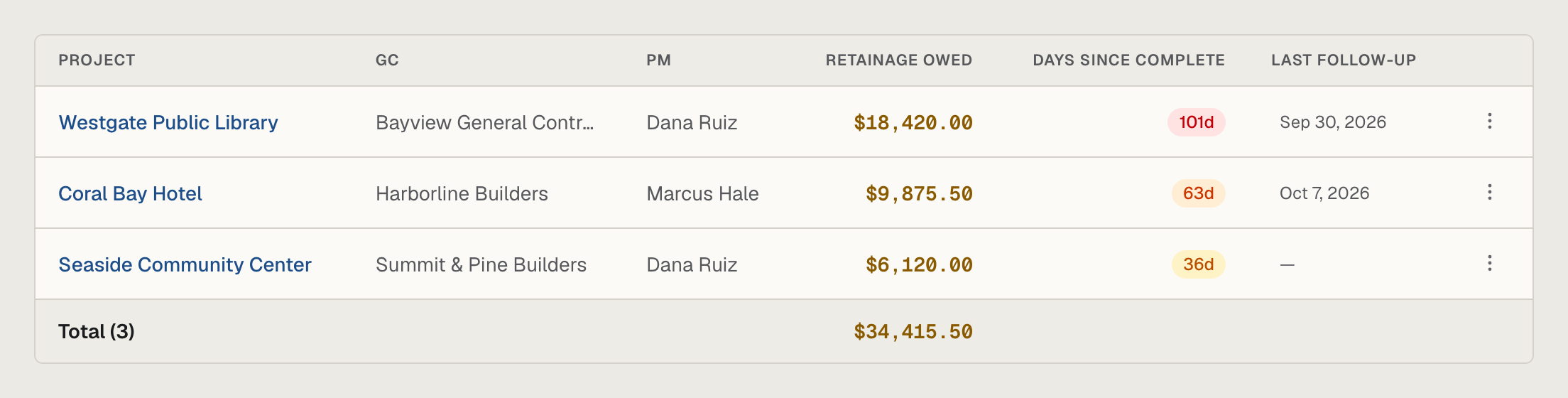
A/R aging, retainage outstanding, and pending change orders on one screen, plus a retainage collections queue for finished jobs. It's the number your banker asks for, ready when they ask.
Centralized Vault for Cash Flow Documents
Instead of digging through email threads and desktop folders, keep your most important billing documents in one place. Pay applications, executed change orders, and releases of lien are linked to their project, and each release to the exact pay app it pays. Your team always has the paperwork a GC's compliance check asks for.
Works With Procore, Textura, GCPay — Any Portal
Your general contractors don't need to change their software. Download the pay application their billing system produces, drop it into
subPAY.ai, and it keeps your contract ledger current.
A Dedicated Operational Tool, Not Accounting Software
subPAY.ai doesn't replace your accounting software, and it doesn't post entries to it. It's a specialized tool for keeping your billing documentation organized: it checks your math, keeps your deadlines in front of you, and puts your documents in order before the clean data goes to your accounting team.
One plan. Everything included.
Per company — unlimited projects, pay apps, and documents.
Includes 1 user · add teammates for $25/month each.
or $1,490/year — 2 months free
- Unlimited projects & pay applications
- AIA G702/G703 PDF generation
- Smart Import — AI reads pay apps, change orders & releases of lien
- Retainage, change order & cash tracking
- Billing calendar with email reminders
$149/mo (or $1,490/yr) after your 14-day free trial. Your pay apps and documents are yours to download anytime.
Frequently Asked Questions
What is subPAY.ai?
subPAY.ai is billing software for construction subcontractors. It keeps every general contractor's pay app deadline on one calendar, reads pay applications, change orders and releases of lien with AI, and tracks every pay app, change order and retainage dollar until it's paid.
Does it work with Procore, Textura and GCPay?
Yes. No integration or GC setup is needed: download the pay application the GC's portal produces and drop it into Smart Import, or log what you submitted. You can also build AIA G702/G703 pay applications in subPAY.ai for GCs you bill directly.
What does Smart Import read?
Pay applications (AIA G702/G703, Procore, Textura and GC forms), change orders and requests for change order, and releases of lien. It fills in the application number, period, gross billed, retainage, change orders and payment due, checks the arithmetic, and waits for you to confirm before anything is saved.
How does it track retainage?
Each pay app records retainage held and released at the rate your contract sets, including a reduced rate later in the job. You see retainage outstanding on every project, and finished jobs move into a collections queue until the retainage is paid.
What happens when a GC sends a release of lien?
Drop it into Smart Import. subPAY.ai reads the amount and through date, matches the release to the pay app it pays (by pay app number or payment amount, including one check covering several pay apps), and marks that pay app approved once you confirm.
Is subPAY.ai accounting software?
No. It doesn't replace your accounting system or post entries to it. It keeps your billing paperwork organized, your math checked and your deadlines visible, so the data your accounting team enters is clean.
How much does it cost?
One plan with everything included: $149 per month or $1,490 per year per company, with unlimited projects, pay applications and documents. It includes one user; each additional teammate is $25 per month. Every account starts with a 14-day free trial, and you can cancel from your account any time before it ends.